
Case study · System
LDC One: the system that runs the station
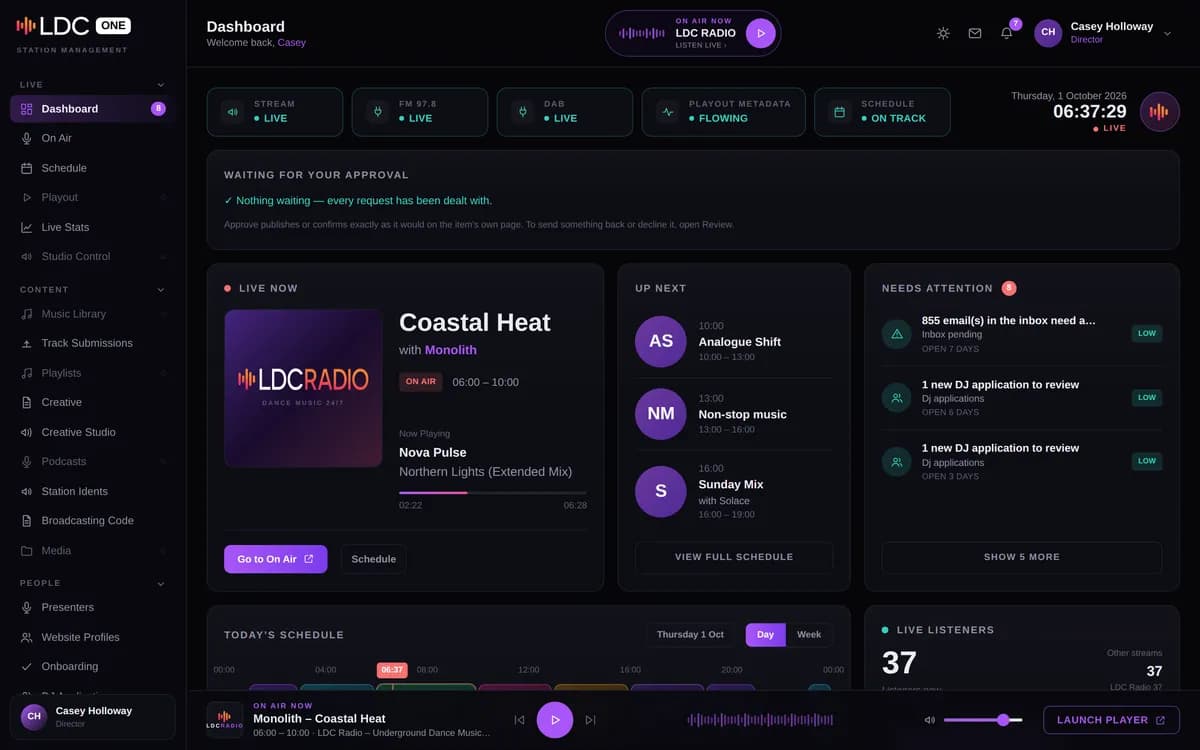
LDC One is the operations platform behind LDC Radio. We built it for ourselves: a custom Next.js web application that the station team signs in to at app.ldcmusic.co.uk.
It is private, so the screenshot here shows it with sample data: the names and contact details in it are made up. This page explains what runs inside, in more detail than its card on our web and digital page.
- What it is
- Private system (staff sign-in)
- Sector
- Operations platform for LDC Radio (our own)
- Built with
- Custom Next.js web application
- Sign-in page
- app.ldcmusic.co.uk
The job the system does
Running a community radio station means juggling a lot of small, connected jobs. The schedule changes. New presenters need taking through onboarding. DJs pay for their slots, and those payments have to reach the accounts. Messages and enquiries arrive by email all day. And the public website needs to show all of it, accurately, without anyone retyping it.
Before LDC One, those jobs lived in separate places. The aim was one sign-in and one set of records, with everything else, the website included, reading from it.
What we built
The show schedule syncs every hour from the API of StationRecord, so nobody maintains a second copy. New presenters move through onboarding in stages, and the website profiles they write, with a bio and a photo, wait for a director’s approval before they appear on ldcradio.co.uk.
DJ slot subscriptions are collected by Direct Debit through GoCardless, and the accounting side is kept in step with Xero. A shared inbox reads the station’s Microsoft 365 mail and drafts replies with AI assistance, and every enquiry form on ldcradio.co.uk, for advertising, DJ hire and web and digital work, files straight into it.
Jobs that run on their own
Scheduled jobs keep the station’s content topped up without anyone pressing a button: local dance events, news from RSS feeds and Yorkshire guides are brought in on a timetable.
Listener figures are gathered in LDC One too, and they are the basis of the audience model on the advertising page.
How it connects
LDC One talks to StationRecord for the schedule, GoCardless for Direct Debits, Xero for the accounts and Microsoft 365 for mail. Each connection does one job, and LDC One is where the results meet.
In the other direction, a content API feeds this website live: the schedule, shows, DJs, events and mixes on ldcradio.co.uk all come from it. That is how the LDC Radio website keeps itself current without anyone editing it page by page.
Thinking about something similar?
A system like this starts with a list rather than a design. Write down every place the same detail is typed today: a name in a spreadsheet, again in an email, again in the accounts, again on the website. Each repeat is a place where the copies can disagree, and each one is a candidate for a single record that everything else reads from.
Next, list the outside services the business already relies on, such as payments, accounts and email, because the useful work is usually in connecting them rather than replacing them. That is how LDC One was put together: one set of records in the middle, with each connection doing one job.
What it runs today
Day to day it runs the station’s schedule, presenters, subscriptions, inbox and website content from one sign-in. You can’t log in to it, but its output is all around you here: the show, DJ and event pages on this website are drawn from its records.
If your business is copying the same details between spreadsheets, email, the accounts and a website, that is the kind of problem a system like this is for. Bespoke software in Leeds explains how we approach one.
Call us or get a quote
Talk it through with LDC on the phone, or send a few lines and we’ll come back to you with a quote.
Get a quote
Tell us what you’re trying to achieve.
A few lines is plenty. Tick what you think you need - or “Not sure” - and we’ll reply by email to talk it through and quote.