Bespoke software in Leeds, built around how your business works
Bespoke software in Leeds for businesses that have outgrown spreadsheets, re-keying and tools that don’t talk to each other. LDC builds CRMs, client portals, booking systems, dashboards and automations shaped around the way your team already works, rather than bending your process to fit somebody else’s product.
We know what that difference feels like because we run our own radio station on a system we built. Our registered office is at Mabgate in Leeds, and we work with businesses across the city and the wider county. If something in your week is slow, fiddly or stuck in one person’s head, tell us about it.
We build business systems whose main users are your own staff or your clients, not people arriving from a search engine. Each one starts from a job that is currently slow, error-prone or living in someone’s inbox.
CRM and lead tracking
Every enquiry, call and quote in one place, with the next action and the person who owns it, so nothing depends on somebody remembering.
Client portals
A secure login where your clients check progress, download documents and send you what you need, instead of you chasing it by email.
Booking systems
Appointments, rooms, vehicles or staff time, following the rules your business really uses about who can book what, and when.
Dashboards and reporting
The figures someone pulls together by hand every Monday, built once and kept current from the data you already hold.
Databases
One trusted record of customers, jobs, stock or equipment, replacing the three spreadsheets that never quite agree with each other.
Automation and integrations
Links between the tools you already pay for, through their APIs, including Microsoft 365 and accounting packages, so information is typed once and flows on by itself.
AI-assisted workflows
Drafting routine replies, sorting incoming messages and summarising long threads, with a person checking the result before anything goes out.
Web applications
Browser-based tools your team or customers can open on any device, with logins, roles and exactly the permissions each person needs. Public websites and the code behind them are covered on our web development page.
Bespoke or off-the-shelf?
Use off-the-shelf software when it fits. If a well-known product does the job with light set-up, it will usually be cheaper and quicker than anything built from scratch, and we’ll say so.
Custom software earns its place when the tool is shaping the business instead of the other way round. These are the usual signs:
Your team works around the software with spreadsheets, copy and paste, or workarounds everyone has quietly learned to live with.
You pay for several subscriptions that each hold part of the picture, and none of them share what they know.
The way you do the work is part of why customers choose you, and a generic product would flatten it.
The feature you need has sat on a supplier’s roadmap for as long as you can remember.
The middle route: connect what you already use
Often the answer is neither. Keep the tools that work, and build the small piece that joins them up: an integration, an automation, or a single screen that pulls everything together. It is the least expensive kind of custom work, and it leaves your team on systems they already know.
We run our own station on software we built
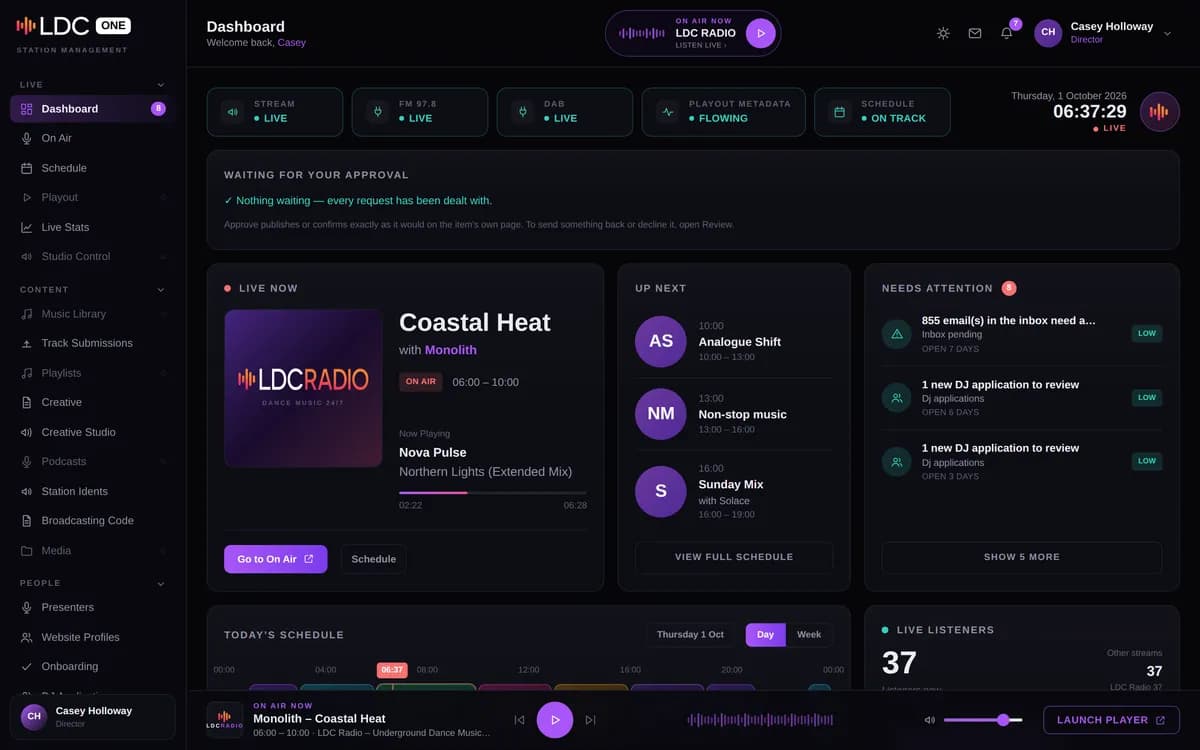
LDC Radio runs on LDC One, a management system we designed and built for the station. It is the most honest evidence we can offer that we understand the gap between software that looks good in a demo and software people rely on all week.
LDC One looks after the work a busy community station would otherwise do by hand:
The on-air schedule, kept in step with the broadcast schedule automatically.
Presenter applications and onboarding, from first contact through to their first show.
DJ slot subscriptions, collected by Direct Debit.
A sync with our accounting software, so the money records line up.
A shared inbox where AI drafts the replies and a person decides what gets sent.
A content API that feeds this website, so shows, DJs and events appear here without anyone editing a web page.
Scheduled jobs that gather local event listings, news headlines and Yorkshire guides without anyone lifting a finger.
Systems we’ve built and run
Three systems that run real organisations behind a sign-in, and one website showing when off-the-shelf tools are the better answer.
Shown with sample data
Operations platform for LDC Radio (our own)
LDC One
LDC One’s daily jobs are listed above. What matters for your project is the joins: it pulls the schedule from StationRecord, collects Direct Debits through GoCardless, keeps Xero in step, reads Microsoft 365 mail and pushes content out to a public website. That is where most business software earns its keep.
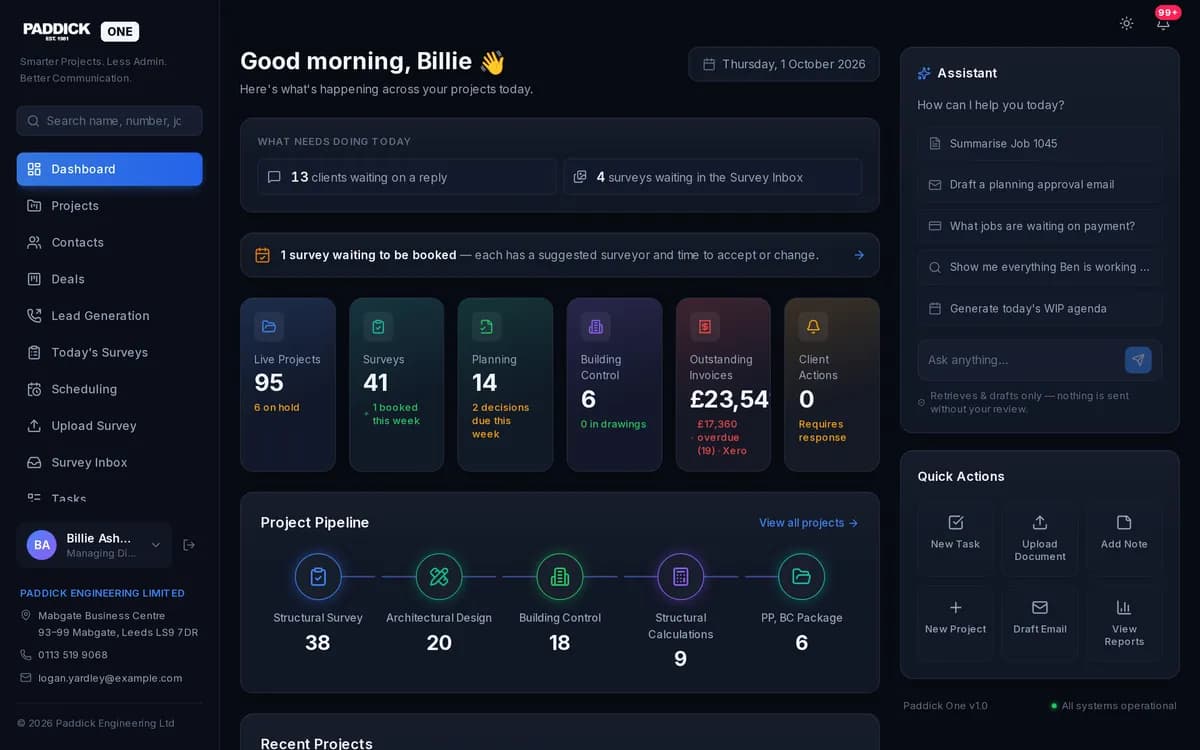
Paddick One runs an engineering and surveying firm from first enquiry to invoice. The office works on clients, quotes and jobs in the browser, surveyors use an Android app built on the same records, and clients get updates as their job moves on. Invoice figures come from Xero rather than being keyed in a second time.
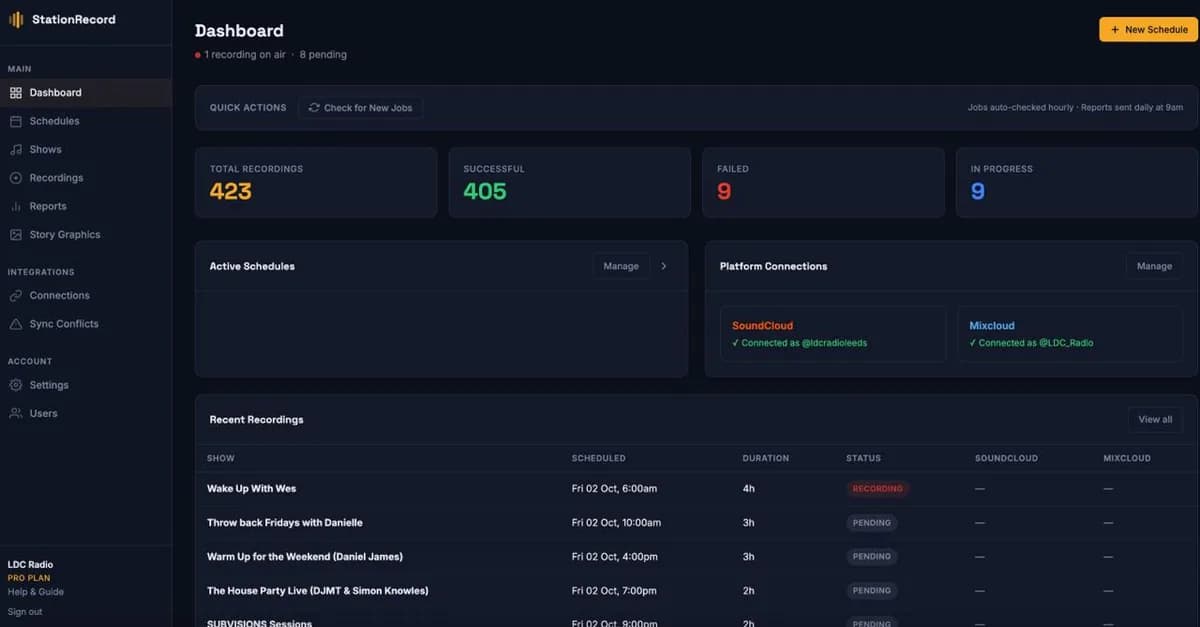
Not every system has to be one big platform. StationRecord, built by LDC director Darren Gibbons, does one job well: it records the shows and holds the schedule. Its API hands that schedule to LDC One every hour, so two separate systems stay in agreement without anybody copying a timetable across.
UK planning application data (subscription service)
Planning Insights
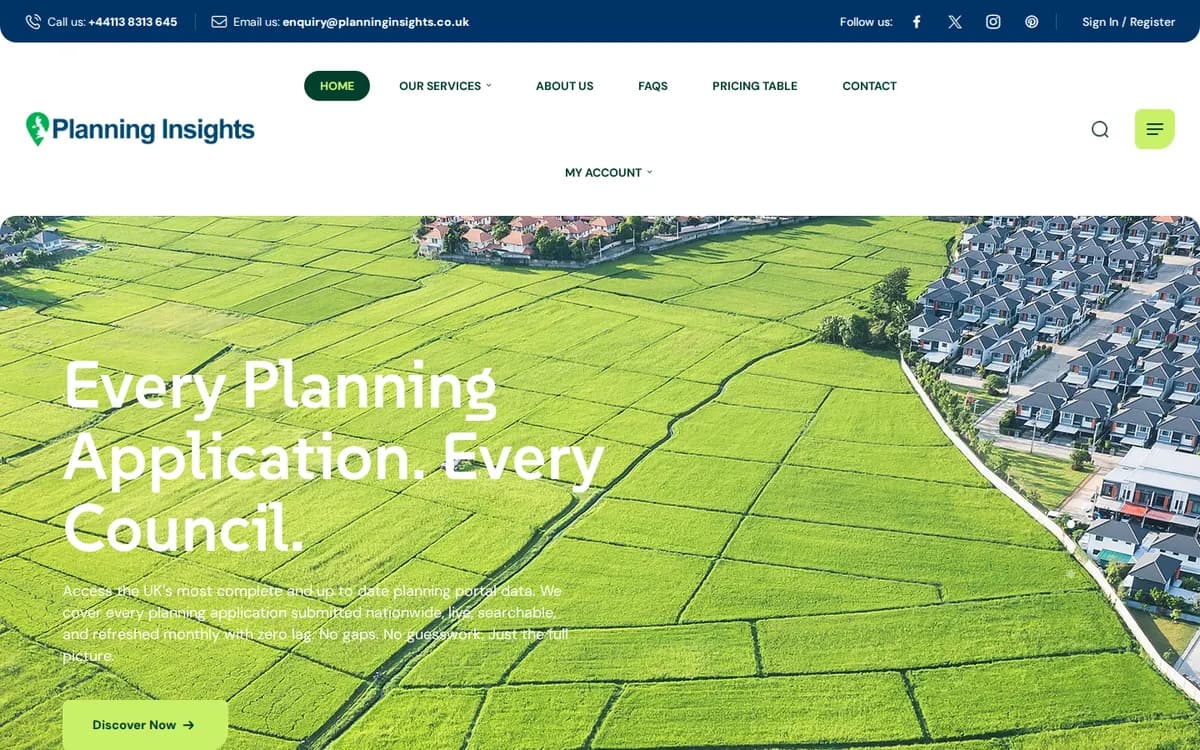
Planning Insights shows the off-the-shelf route done properly: WordPress and WooCommerce rather than custom code. Visitors can register, sign in to an account area and buy a subscription through a working checkout. The homepage enquiry form makes people pick the service they’re asking about, so each lead arrives already tagged.
The price of custom software is set by what it has to do and how many moving parts it has, not by a rate card. These are the things that move it most.
Scope of the first version
How many processes it covers on day one. A tight first version costs less and starts earning its keep sooner.
User types and permissions
Staff, managers, clients and suppliers who each see different things mean more screens, more rules and more testing.
Integrations
Every connection to accounting, email, payments or another system has to be built, tested and looked after when the other side changes.
Data migration
Moving records out of spreadsheets or an old system, then cleaning and checking them, can be a sizeable job in its own right.
Design polish
An internal tool used by a handful of people can be plain and fast. Something your clients log into deserves more care.
Reporting
Simple lists are quick to add. Custom dashboards, exports and scheduled reports take longer to get right.
Hosting and support after launch
Software needs somewhere to run and someone looking after it. Agree how that will work before the build starts, not after.
To keep the cost down, define a clear first version, phase everything else, and reuse the tools you already pay for wherever they do the job. After a short conversation we’ll quote for an agreed scope. Call 07540725926 to start that conversation.
How long it takes
It depends on scope, and we’d rather tell you that than invent a number. A tool that handles one process for one team is much quicker to build than a platform that runs several parts of the business.
Phased delivery changes the question. Instead of waiting for everything, you start using the first version while the next stage is built, and the timescale for each stage is agreed before it begins.
What to prepare before you get in touch
You don’t need a specification. These five things make the first conversation far more useful.
The process you want to fix, described in your own words, including the part everyone complains about.
Who uses it now, and who would use the new system: staff, managers, clients or suppliers.
The tools and spreadsheets involved today, and which of them you’d happily never open again.
What ‘done’ looks like: hours saved, mistakes gone, or the report you finally get without chasing anyone.
Any deadlines, such as a contract renewal, a busy season or a new starter.
Questions
Bespoke software Leeds questions
Is bespoke software better than off-the-shelf?
Not always. If an established product fits your process with light set-up, use it: it will be cheaper and quicker. Custom software makes sense when your team keeps working around a tool, when several subscriptions each hold part of the picture, or when the way you work is part of what customers pay for. Often the best answer is to keep what works and build the piece that connects it. Here’s how to decide.
How much does bespoke software cost?
It depends on what the system has to do, how many types of user it serves, what it connects to and how much data needs moving across. We don’t publish prices, because two projects with the same name can differ enormously. After a short conversation we’ll quote for an agreed scope. See what affects the cost, or call 07540725926 to talk it through.
How long does bespoke software take to build?
A single-process tool can be in use far sooner than a platform covering several departments. We usually recommend a first version that solves the most painful problem, which you start using while later stages are built. Each stage gets its own timescale, agreed with you before work begins, so you are never stuck waiting on one long, open-ended build.
Can it work with Xero, Microsoft 365 or the tools we already use?
Often, yes, as long as the tool offers an API or a reliable export. Our own station system syncs with accounting software and with a Direct Debit provider. We check every tool on your list before committing to anything, because some connections are straightforward and others are limited by what the supplier allows.
Can you add AI to our workflows?
Yes, where it genuinely saves time. Good first uses are drafting replies to routine emails, sorting and tagging incoming messages, and summarising long threads or documents. Our own shared inbox drafts replies with AI, and a person always reads and approves them before anything is sent. We’d build yours the same way: AI does the first draft, your team keeps the decision.
Do we need a full specification before we start?
No. Most good systems start from a clear description of the process and the problem, not a long document. We map the work with you, agree a first version, and build it in stages you can see and use. The detail gets settled as real use shows what matters, which is usually cheaper than guessing everything up front.
Get a quote
Tell us what you’re trying to achieve.
A few lines is plenty. Tick what you think you need - or “Not sure” - and we’ll reply by email to talk it through and quote.