
Case study · System
Paddick One: one picture of every job
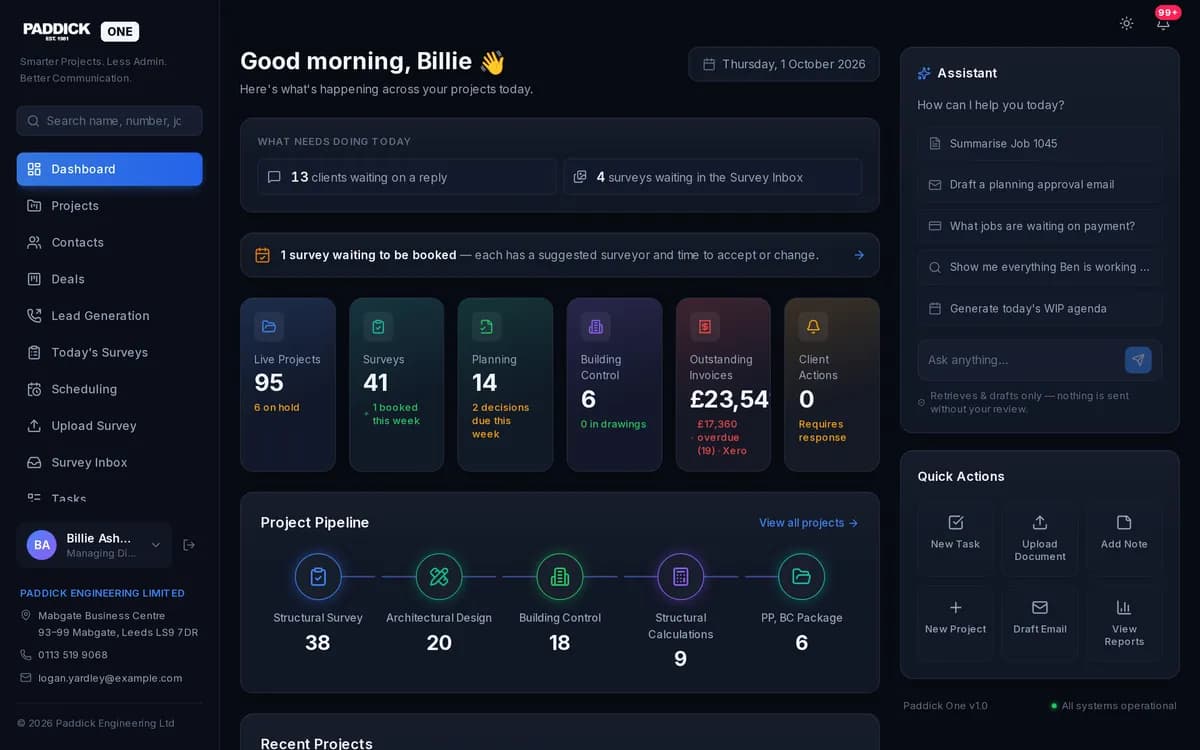
Paddick One is the operations platform we built for Paddick, the engineering and surveying firm behind paddick.online. It is a custom Next.js web application with a native Android app for the surveyors, and staff sign in with Microsoft at portal.paddick.online.
It holds private client data, so the screenshot shows it with sample data only. This page goes into what it does in more detail than its card on our web and digital page.
- What it is
- Private system (staff sign-in)
- Sector
- Operations platform for an engineering firm
- Built with
- Custom Next.js web app · Android app
- Sign-in page
- portal.paddick.online
The job the system does
An engineering and surveying practice is a pipeline. An enquiry comes in and becomes a quote. An accepted quote becomes a job, the job needs a survey booking, and the work ends in an invoice that has to be paid. At every step the client wants to know where things stand.
When those steps live in different inboxes, diaries and spreadsheets, things slip between them. Paddick needed one picture of every client and every job that the whole office, and the surveyors out on site, could work from.
What we built
At its core is a CRM holding clients, deals and quotes. Once a job is won, work-in-progress tracking takes over and follows it through to completion. Surveys are scheduled from the same records, and a client journey sends the client notifications as their job moves forward, so they hear about progress without having to chase.
Staff chat links the office and the surveyors, in the web app and in the Android app, where surveyors also see the day’s work.
Where the work comes from
Paddick One also helps the office look back. Lead generation and enquiry attribution show where enquiries come from, and a daily activity overview gives a picture of what happened in the office that day.
How it connects
Xero stays the record for money. Invoices and their status sync in from the firm’s accounts, so nothing is typed twice and the money side always comes from the accounts.
Staff sign in with their Microsoft work accounts, so there is no separate password to look after. The Android app works from the same records as the office, so a job reads the same at a desk as it does on site. And the public website, paddick.online, which we also built, links to the sign-in page.
Thinking about something similar?
If your work moves through stages, from enquiry to quote to job to invoice, the first step is to write those stages down as your office actually uses them, including the awkward exceptions. The stages become the backbone of the system, and every screen hangs off them.
The second step is to decide what stays where it is. For Paddick, the accounts stayed in Xero and sign-in stayed with Microsoft, and the new system reads from them instead of competing with them. Keeping the tools people already trust, and joining them up, is usually quicker to adopt than replacing everything at once.
What it runs today
It runs the firm’s enquiries, quotes, jobs, survey bookings, client updates and invoice status in one system: in the browser at the office, and on Android out on site. The sign-in page at portal.paddick.online is the only part the public can see.
If your business runs on a pipeline like this, bespoke software in Leeds explains how we approach building one.
Call us or get a quote
Talk it through with LDC on the phone, or send a few lines and we’ll come back to you with a quote.
Get a quote
Tell us what you’re trying to achieve.
A few lines is plenty. Tick what you think you need - or “Not sure” - and we’ll reply by email to talk it through and quote.